| .forgejo/workflows | ||
| demo | ||
| dotgit.sh | ||
| LICENSE | ||
| README.md | ||
| screenshot.png | ||


dotGit ::: 🪄 dotfiles + 🧸 bare git repo + 🐚 shell aliases
a minimal and effective approach to dotfiles (and git repos)

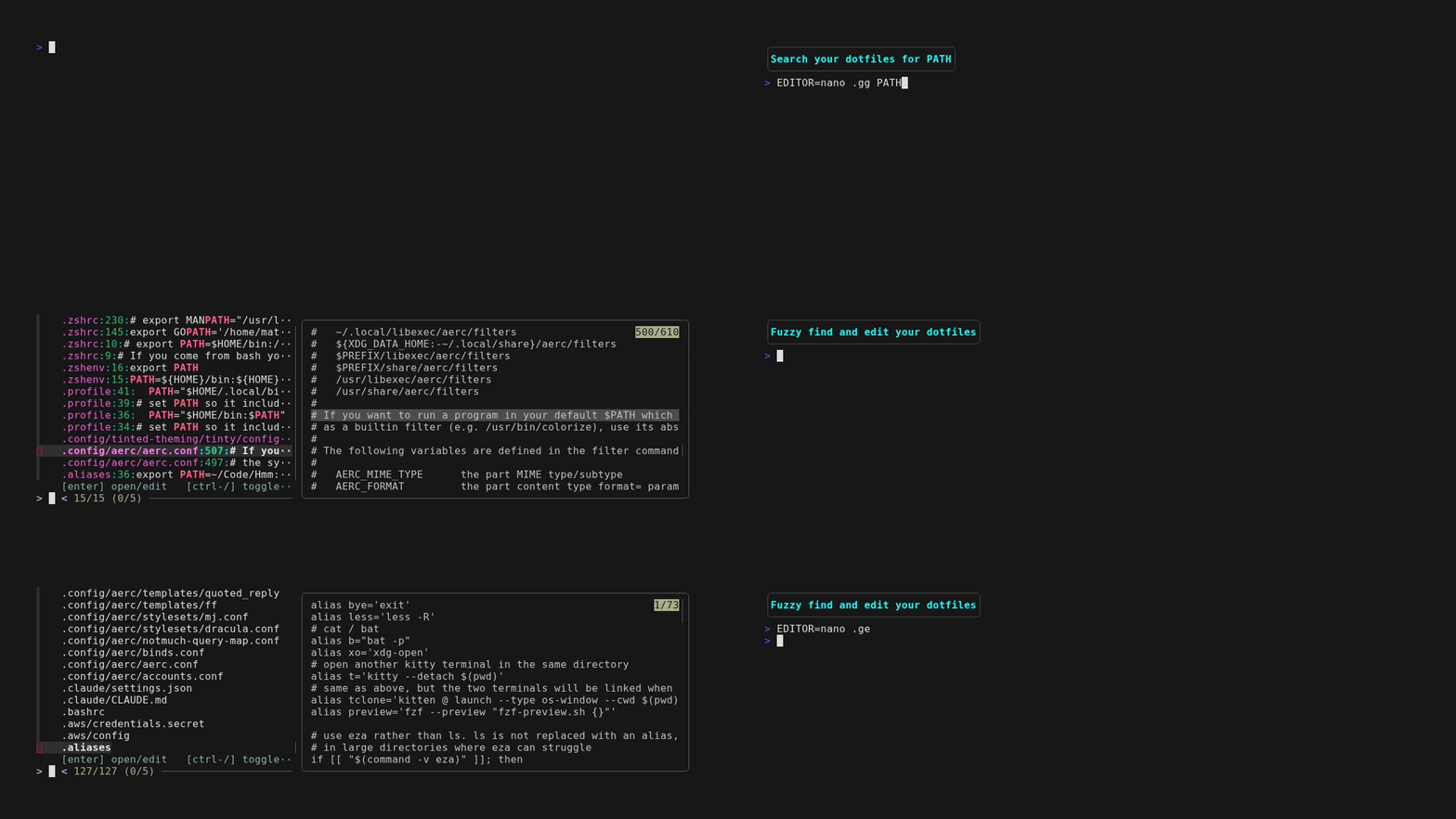
Dotfiles are scattered across $HOME. Can't remember where you set the PATH, or where you defined that alias three months ago? .gg PATH greps across every tracked dotfile and drops you straight to the line. .ge fuzzy-finds any file by name with a live preview. Under the hood it's a bare git repo, so files stay exactly where tools expect them and everything else is standard git behind some aliases.
Bonus: set DOTGIT_ANYGIT=yes and the same gg/ge aliases (without the leading dot) work across all your repos.
TL;DR
# 1. in your .zshrc or .bashrc:
export DOT_REPO="${HOME}/.dotfiles"
export DOT_HOME="${HOME}"
export DOT_ORIGIN="git@github.com:user/dotfiles.git"  # optional
source /path/to/dotgit.sh

# 2. initialize a new repo, or clone an existing one
.ginit        # new repo
.gclone       # clone from DOT_ORIGIN

# 3. daily use
.ge zshrc     # fuzzy-find and edit files matching "zshrc"
.gg PATH      # grep across dotfiles, jump to result
.gss          # status
.ga .zshrc    # stage a file
.gc -m 'msg'  # commit
.gp           # push
usage
.ge — fuzzy find and edit
.ge opens a fuzzy file finder across all tracked dotfiles. Type to narrow by filename, and get a live syntax-highlighted preview of each file on the right. Select one or more files and they open in $EDITOR.
.ge            # browse all dotfiles
.ge zsh        # pre-filter to files with "zsh" in the name
.gg — grep and jump
.gg runs git grep across all tracked dotfile contents and presents the matches interactively. Select a result and your editor opens directly at that line.
.gg PATH       # find every place PATH is set or referenced
.gg 'alias g'  # find all git aliases
Everything else is a standard git alias pointed at the dotfiles repo.
a normal workflow for making configuration changes
.gl- pull changes from origin- make some changes. Try:
.ge zshrc- presents all files withzshrcin the name.gg PATH- runsgit grepacross your dotfiles and presents the results
.gc -m 'commit comment' .zshrc- will commit the changes.gp- pushes the changes to the origin
a list of all aliases defined
| alias | action | note |
|---|---|---|
| .git | git --git-dir=${DOT_REPO} --work-tree=${DOT_HOME} |
|
| .g | .git |
|
| .ga | .git add |
|
| .gc | .git commit |
|
| .gco | .git checkout |
|
| .gd | .git diff |
|
| .gds | .git diff --stat |
|
| .ge | fuzzy find and edit dotfiles 1 | |
| .gg | grep dotfiles and open at the matched line 2 1 | falls back to .git grep without fzf |
| .gss | .git status --short |
|
| .glo | .git log --oneline --decorate |
|
| .glg | .git log --stat |
|
| .glgp | .git log --stat --patch |
|
| .gbl | .git blame -w |
|
| .gb | .git branch |
|
| .gba | .git branch --all |
|
| .gbd | .git branch --delete |
|
| .gbD | .git branch --delete --force |
|
| .gm | .git merge |
|
| .gma | .git merge --abort |
|
| .gmc | .git merge --continue |
|
| .gc! | .git commit --verbose --amend |
|
| .gcm | .git commit --message |
|
| .gcp | .git cherry-pick |
|
| .gcpa | .git cherry-pick --abort |
|
| .gcpc | .git cherry-pick --continue |
|
| .gclean | .git clean --interactive -d |
|
| .gp | .git push |
requires DOT_ORIGIN be set |
| .gl | .git pull |
requires DOT_ORIGIN be set |
| .lazygit | lazygit -g ${DOT_REPO}/ -w ${DOT_HOME} |
requires lazygit be installed |
| .gitui | gitui -d ${DOT_REPO}/ -w ${DOT_HOME} |
requires gitui to be installed |
| .gclone | git clone --bare "${DOT_ORIGIN}" "${DOT_REPO}"; .git config --local status.showUntrackedFiles no |
3 |
| .ginit | git init --bare "${DOT_REPO}"; .git config --local status.showUntrackedFiles no |
requirements
EDITORset to your liking- git
- bat (optional, default preview command)
- fzf (optional)
- lazygit (optional)
- gitui (optional)
installation
- clone this repository or simply copy the dotgit.sh
- add some configuration sauce to your shell initialization (.i.e.
.zshrcor.bashrc). TheDOT_REPOandDOT_HOMEvariables must be set for the dotgit.sh to load!
export DOT_REPO="${HOME}/.dotfiles"   # this is where the repo will live
export DOT_HOME="${HOME}"             # this is generally the same as `$HOME`
export DOT_ORIGIN="git@github.com:user/your-dotfiles-repo.git"   # optional
source <path to dotGit.sh>
- restart your shell or
source ~/.zshrcorsource ~/.bashrc - run
.ginitto start a new repo, or.gcloneto clone an existing one- if cloning:
.gco <branch>to checkout your config files (see initial clone cleanup below if files conflict) - if initializing: start tracking files with
.ga
- if cloning:
configuration
DOT_REPO and DOT_HOME must be set before sourcing dotgit.sh. All other variables are optional.
| variable | default | description |
|---|---|---|
DOT_REPO |
(required) | path to the bare git repository |
DOT_HOME |
(required) | work tree root, usually $HOME |
DOT_ORIGIN |
(unset) | remote URL; enables .gp, .gl, and .gclone |
DOTGIT_PREVIEW |
bat -p --color=always |
fzf preview command |
DOTGIT_MULTI_LIMIT |
5 |
max files selectable at once in .ge and .gg |
DOTGIT_OPEN_FMT |
split |
how .gg passes file+line to the editor; split uses +line file (works with most editors); set to +e {file}|{line} for vim/nvim multi-file line jumping |
DOTGIT_ANYGIT |
(unset) | set to yes to also load unprefixed g* aliases for any git repo |
DEBUG |
(unset) | set to any value to print load/unload messages |
ANYGIT
Setting DOTGIT_ANYGIT=yes causes dotGit to source a transformed copy of itself that registers a parallel set of aliases without the leading . — so .ga becomes ga, .gc becomes gc, etc. These work against whichever git repo your shell is currently in, like ordinary git aliases. Yes, ge and gg are included.
initial clone cleanup
Existing configuration files will prevent checking out the files. To list the files causing the checkout to fail, run the following.
.g checkout 2>&1|grep -E '^\s'|cut -f2-|xargs -I {} echo "{}"
To remove all the conflicting files, simply change the echo in the above command to rm. This will delete files, so be sure you want to remove them. Once the files are removed the checkout will succeed.
future features
- command line completion
- manage system configuration files
alternatives
- GNU Stow
- dotbare (this is close in spirit to dotGit, and can be used together with dotGit from what I can tell)
- Home Manager
-
Opens the editor with
+line filearguments. Works with vi, emacs, nano, micro, and any editor that accepts+N. For vim/nvim multi-file line jumping setDOTGIT_OPEN_FMT='+e {file}|{line}'(note: literal|, not\|). ↩︎ -
Also set git's
status.showUntrackedFilestono. This prevents every file in$DOT_HOMEfrom showing as "untracked" by git. ↩︎